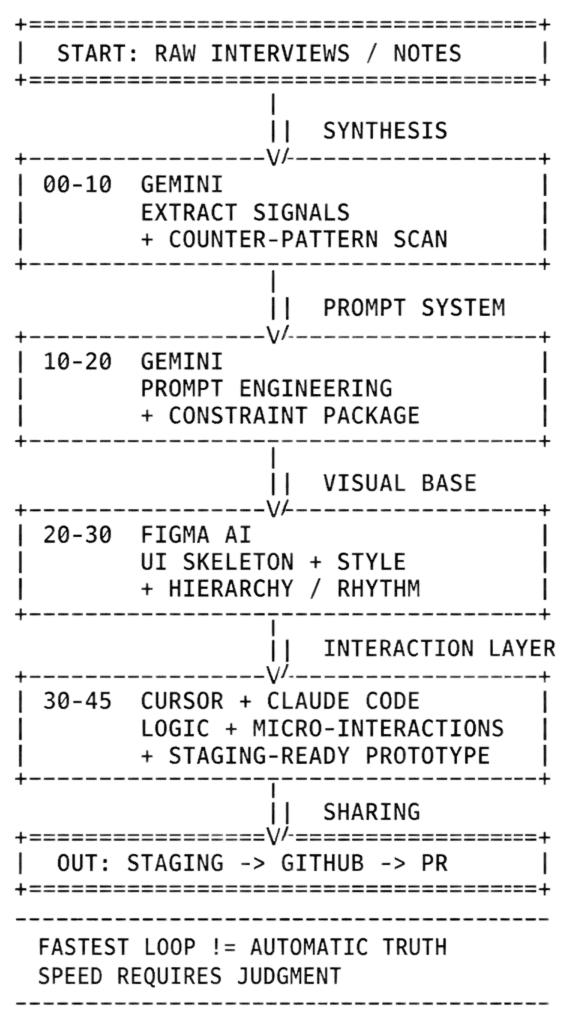
This is the fastest repeatable loop I have right now when I need to go from messy research to something testable. It is not perfect and it is definitely not fully autonomous, but it consistently gets me to a usable prototype faster than my old deck-to-Figma flow.
Research and synthesis: I start in Gemini with interview notes and context from prior studies. I ask it to extract key themes, tension points, and direct quotes that capture user pain in plain language. Then I force a second pass: counter-patterns, outliers, and anything that might challenge the first narrative. The goal is not just synthesis speed. The goal is avoiding false confidence.
Prompt creation: I use Gemini to build a tight prompt package for generation: user problem, job to be done, constraints, success signal, anti-goals, and interaction requirements. This is where most quality is won or lost. Better prompt structure means less cleanup downstream.
Establish the UI: I move into Figma Make to draft the UI skeleton and visual baseline. I am not asking it for final pixels. I am asking for structure: information hierarchy, component rhythm, and layout logic. If the skeleton is weak, code output quality drops immediately.
Define functionality and interactions: I move into Cursor and Claude Code to build the prototype in code. Here I focus on real interactions: state changes, edge conditions, transitions, and response behaviors that static frames cannot communicate. If useful, I wire it into staging, push to GitHub, and share the link as an interactive artifact instead of another slide deck.
Why this works for me: people in the org consume websites faster than decks. A coded prototype makes tradeoffs concrete, gives engineering a truer artifact to react to, and makes research findings feel closer to shippable decisions. It is still messy. A lot still dies in limbo. But this loop has materially improved how quickly I can turn insight into something people can actually use.